
Investor Tool Explanation
The Investor Tool contains the current list of candidate properties. A new list is sent on Tuesdays and Fridays. These are candidates only, not necessarily properties we would recommend. Each property requires further evaluation before we recommend it.
See the annotated screenshot below.
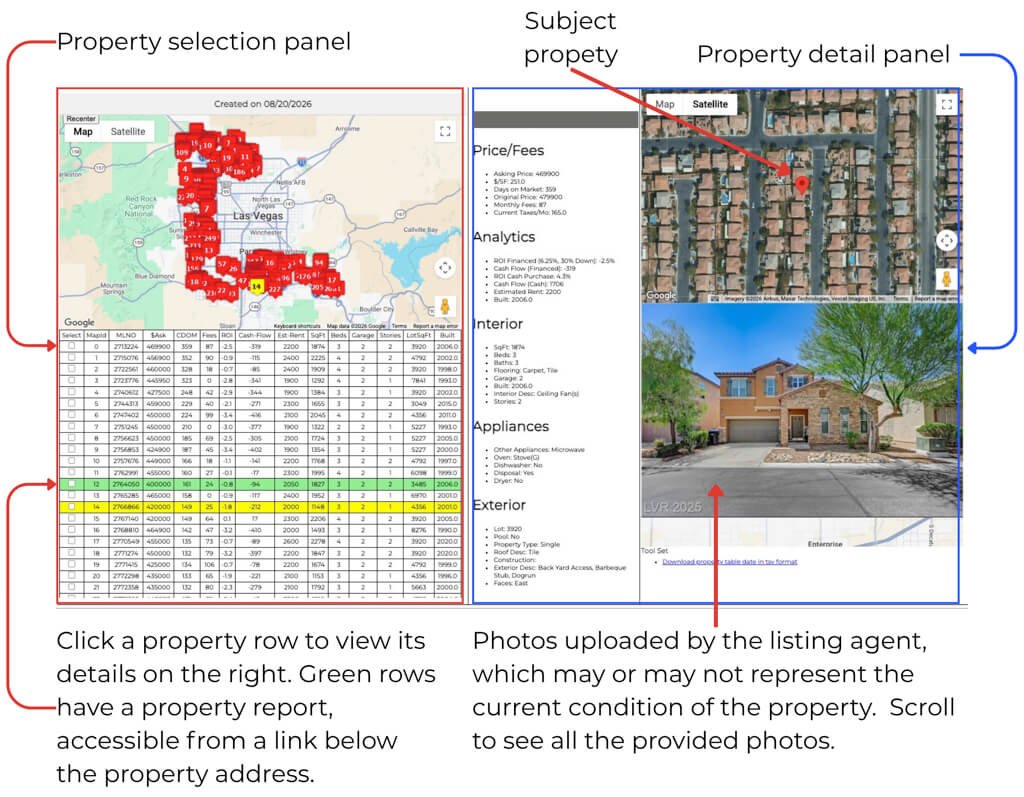
The Investor Tool is divided into two panels. The left panel lists all candidate properties. The right panel shows details for the property selected in the left panel.
To select a property, click a row in the table or a map marker. When you select a property:
-
A map marker turns yellow to show its location.
-
The right panel displays the property’s MLS information.
Notes:
-
If the selected row has a green background, a Property Report exists. The report contains what we know about the property at that point in time. If the property is of interest to a client, we continue adding information until we eliminate it or recommend it.
-
Both top maps are live. You can drag them and zoom in or out as needed.
-
The listing agent uploaded the property photos. They may not represent the property’s current condition. If the Property Report includes a video link, rely on the video for the property’s current condition.
-
Much of the property information comes from the MLS and may not be accurate.